
Queue
Everything is processed in a single queue, on the server (vt/processor.py). It keeps working if you close the tab or reload, and it resumes where it left off if you restart the server. It is saved in data/queue.json.
Order and priorities
Section titled “Order and priorities”- The video you are watching always goes first. It is processed from your playback position to the end, then whatever came before; if you jump to an unprocessed part, processing jumps with you. When you go back to the library it stays in the queue like any other.
- Prioritized videos: Priorizar (Prioritize), on the card or in the Queue, puts a video first. If it is already downloaded, it goes ahead of the background work in progress, which resumes later without losing progress.
- Everything else, in the order it was added.
If a stretch that was already recognized is missing its translation or voice (because processing was interrupted), the queue completes it when it gets there.
Pausar (Pause) stops background processing; the video you are watching keeps being processed. Downloads don’t use the GPU and continue even while the queue is paused. If you pause with no video open, the models leave the GPU immediately.
Queue panel and screen
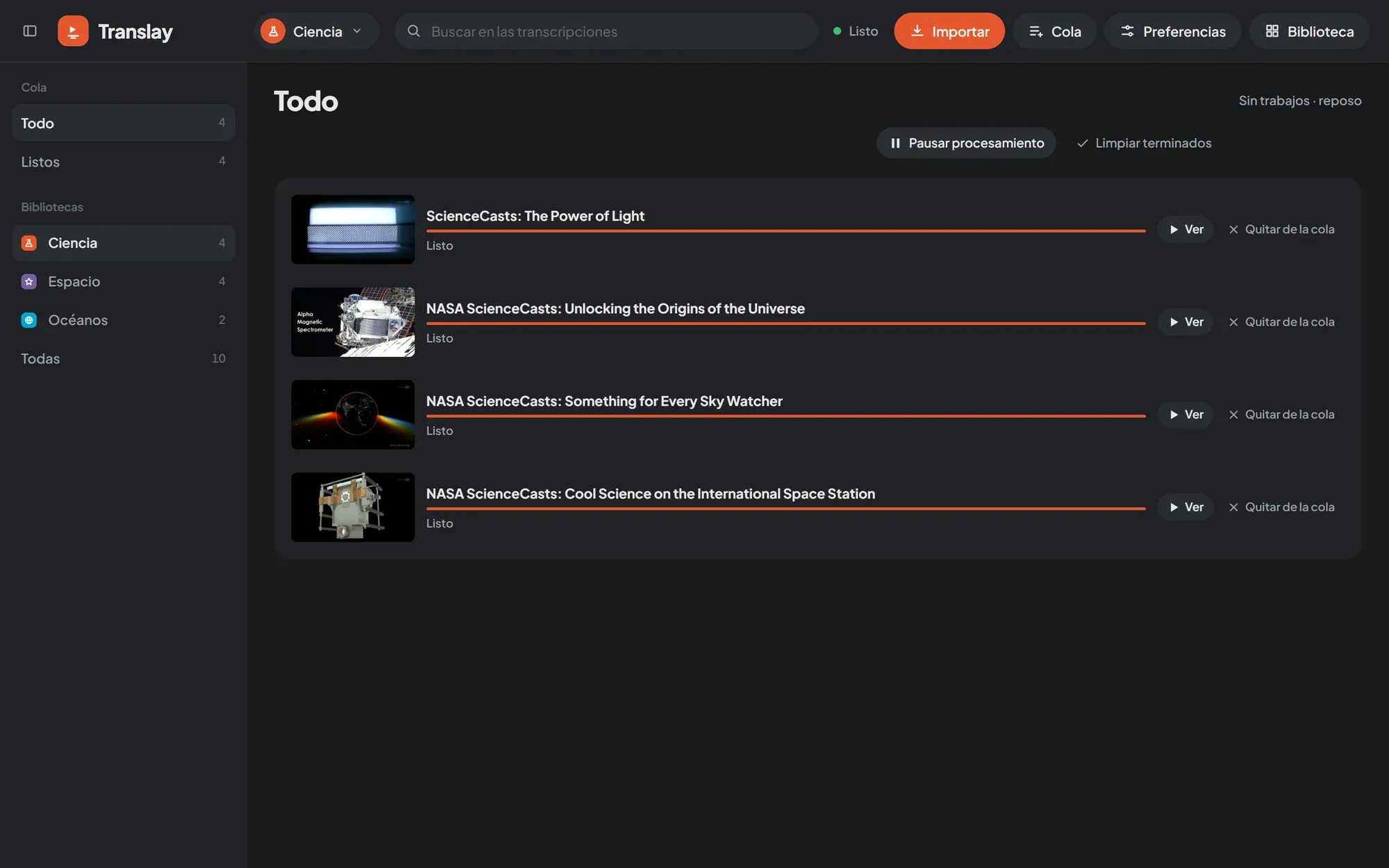
Section titled “Queue panel and screen”The Cola (Queue) button in the header carries a number with what is pending in the open library. Tapping it opens a panel with the overall status, Pausar or Reanudar (Resume), exports, downloads in progress and the first 50 jobs. Ver todo (See all) opens the full screen.
The Queue screen has the states on the left, with their counts, and the list on the right, 100 at a time:
| State | What it shows |
|---|---|
| Todo (All) | All jobs, with what downloads first. |
| Descargando (Downloading) | What is being downloaded, with percentage, speed and time remaining. |
| Procesando (Processing) | The job in progress (“Viendo · N %”, meaning Watching, if it is the open video). |
| En cola (Queued) | What is waiting for its turn. |
| Descargados sin traducir (Downloaded, not translated) | What was imported with Solo descargar (Download only). They have Procesar (Process). |
| Con error (Failed) | What failed, with the reason. |
| Listos (Done) | What is finished. |
If you have more than one library, below you can choose which one’s jobs to see, or Todas (All). If there are exports, they appear in their own section.
The header has Pausar procesamiento (Pause processing) or Reanudar procesamiento (Resume processing), Reintentar descargas (Retry downloads, only with downloads paused) and Limpiar terminados (Clear finished), which removes from the list what is done, downloaded without translation and what failed. Each job has Ver (View), Quitar de la cola (Remove from queue) and, depending on its state, Priorizar or Procesar.
Downloads
Section titled “Downloads”Downloads run on a separate thread, one at a time and with a short random pause between them, so they don’t look like a burst to YouTube. To avoid filling the disk, only a few videos ahead of what has already been processed are downloaded; prioritized videos, ones you ask to open and ones imported with Solo descargar don’t wait for that turn.
With Preferences › Importar y descargas › Orden de las descargas › Aleatorio (variado) (Preferences › Import and downloads › Download order › Random (varied)), downloads come from anywhere in the queue; prioritized ones still go first.
Each download shows its stage: first the video and then the audio (with percentage, speed and time remaining), then “uniendo” (merging) and “preparando” (preparing), while the tracks are joined and the audio to be processed is separated.
If YouTube asks you to verify you are not a bot
Section titled “If YouTube asks you to verify you are not a bot”After many downloads in a row, YouTube may ask for that verification. Translay does not mark the videos as failed: it pauses all downloads for 20 minutes, notifies you once and switches to a careful mode, with longer pauses between downloads and between requests. The Queue status says how many minutes remain.
When you import a new YouTube session, downloads continue right away and normal mode returns. Reintentar descargas also resumes them without waiting. How to import the session: YouTube.
Retries
Section titled “Retries”A video that could not be downloaded waits 10 minutes before retrying (“Falló la descarga · se reintenta en unos minutos”, meaning the download failed and will be retried in a few minutes). After 3 attempts it stays in Con error, with the reason in plain words (private, deleted, private playlist, session problem…).
Idle mode
Section titled “Idle mode”The models use the GPU only while there is something to process. After a while without use they move to system memory and, a little later, the voice process shuts down and the GPU is free. When you open a video they load again right away; meanwhile the player says “Cargando modelos” (Loading models). The header status sums it up in words: “En reposo” (Idle), “Cargando modelos”, “Procesando · 42 %” (Processing), “Descargando” (Downloading) or “Listo” (Ready).
The details on timing and memory are in GPU and idle.